Backup Strategy: The Data Backup Guide Every Business Needs | KTNBS
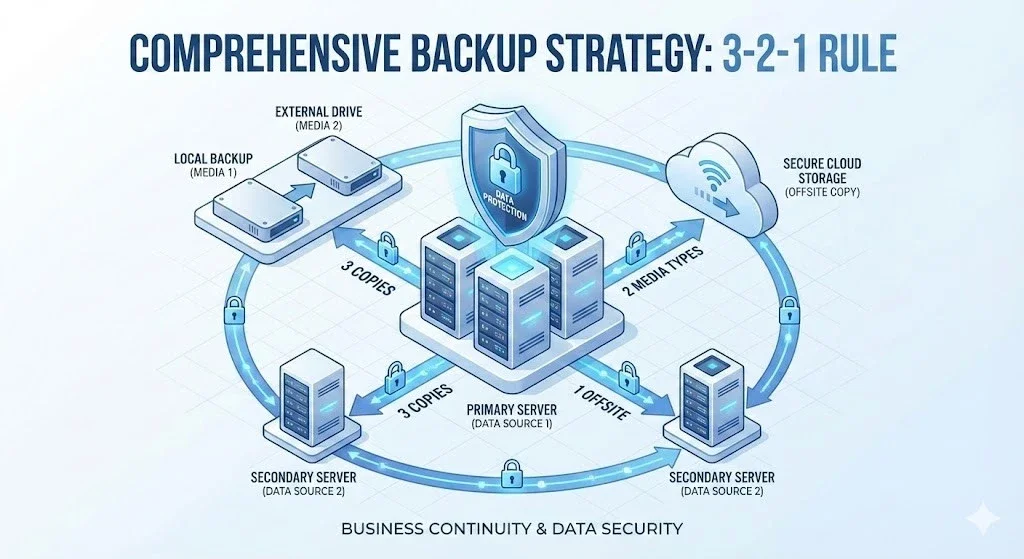
Learn a complete backup strategy: the 3-2-1 rule, how to back up your data, ransomware protection and disaster recovery. Protect your business data today with a free consultation.
Backup Strategy: A Complete Data Backup Guide for Every Business
A backup strategy, or data backup, is no longer just an option—it is a critical strategic necessity for every business. Data loss can destroy an organization, with 60% of small businesses that lose critical data closing within 6 months. This Backup Strategy guide will help you protect your business with proven data backup methods and planning for Disaster Recovery
In this guide, you will learn how to implement your Backup Strategy effectively, using industry-standard approaches such as the 3-2-1 Backup Rule, understand the different types of backup and protect against Ransomware attacks that threaten both your primary data and your backup data.
Understanding Backup Strategy: What It Is and Why Your Business Needs One
A backup strategy, or data backup plan, is a systematic plan that defines how, when and where your organization backs up its critical data. Backup Strategy that is effective includes:
- Data classification and prioritization
- Backup frequency and scheduling
- Storage locations (on-site and off-site)
- Recovery procedures and testing
- Security measures including encryption
- Retention policies for regulatory compliance
The real cost of data loss
Before adopting a Backup Strategy you need to understand what risks you face:
The main causes of data loss:
- Hardware failure: 45% - hard drives, servers and storage systems fail
- Human error: 29% - accidental deletion, overwriting, misconfiguration
- Ransomware attacks: 21% - cybercriminals encrypt data and demand a ransom
- Natural disasters: 3% - floods, fires and earthquakes destroy infrastructure
- Malware and viruses: 2% - software damage and data theft
The business impact of data loss:
- Average cost of downtime: $5,600 per minute for large organizations
- 93% of companies without a disaster recovery plan that lose data for more than 10 days go bankrupt within 1 year
- Average cost of a data breach: $4.45 million worldwide
- Loss of customer trust and damage to the brand
- Fines for non-compliance with regulations (GDPR, HIPAA and others)
The 3-2-1 Backup Rule: The Foundation of Every Backup Strategy
The 3-2-1 backup rule is the gold standard for every Backup Strategy . This approach has protected organizations worldwide for decades.
The 3-2-1 Backup Rule Explained
3 = keep 3 copies of your data
- 1 primary copy / production data (the data in use)
- 2 backup copies (redundancy for safety)
- Don't rely on a single backup—redundancy is essential
2 = two different types of storage media
- Protects against failures specific to one type of media
- Examples:
- On-premises NAS + cloud storage
- External Hard Drive + Tape Backup
- On-premises server + object storage
- Different technologies fail in different ways
1 = keep 1 copy off-site
- Protects against site-specific disasters
- Options: Offsite Backup:
- Cloud backup services (AWS, Azure, Google Cloud)
- A secondary data center
- A disaster recovery site
- A secure off-site vault
The evolution: the 3-2-1-1-0 backup strategy
Modern threats call for a Backup Strategy with extra layers:
The 3-2-1-1-0 rule adds:
+1 = keep an air-gapped or immutable backup
- Air-gapped: physically separated from your network
- Immutable: write once, read many (WORM), cannot be modified
- Ransomware protection: attackers cannot encrypt offline backups
- Essential for cyber resilience
0 = zero errors in recovery testing
- Regular Disaster Recovery drills
- Recovery procedures that are documented and verified
- Backup integrity that has been confirmed
- Recovery time objectives (RTO) that have been tested
5 Types of Backup Your Backup Strategy Needs
Backup Strategy should use different types of backup according to the importance of the data and your recovery needs
1. Full Backup: Complete Data Protection
Full Backup Copies everything, every time
Pros:
- The backup process and Disaster Recovery are the simplest
- Data recovery is the fastest
- A single recovery point—no dependencies
- Best for Baseline Backup
Cons:
- Needs the most storage space
- Takes the longest to back up
- Uses the most bandwidth
- Highest cloud storage cost
Best practices:
- Schedule weekly or monthly
- Use as the baseline for incremental/differential backups
- Best for: critical systems, databases, compliance archives
2. Incremental Backup: Efficient Daily Protection
Incremental Backup Saves only the changes since the last backup of any type
Pros:
- Uses the least storage
- Fastest backups to complete
- Low bandwidth requirements
- Cost-effective for frequent backups
Cons:
- Complex recovery (needs the Full plus every incremental)
- Longer recovery time
- Risk from chain dependency
Best practices:
- Run daily after a Full Backup
- Limit the chain to 6-7 days before a new Full
- Best for: frequently changing data, large data sets
3. Differential Backup: A Balanced Approach
Differential Backup Copies all changes since the last Full Backup
Pros:
- Faster recovery than incremental (needs only the Full plus the latest differential)
- Simpler recovery process
- A good balance of speed and storage
- No chain dependency
Cons:
- Larger than incremental
- Grows until the next Full Backup
- Uses more space than incremental
Best practices:
- The ideal middle ground for most businesses
- Run daily with a weekly Full Backup
- Best for: business-critical applications, databases
4. Mirror Backup: Real-time Replication
Mirror Backup Creates an exact real-time copy
Pros:
- Instant failover capability
- No compression delay
- Direct file access
- Zero RPO (recovery point objective)
Cons:
- Vulnerable to ransomware
- No version history
- Deletions propagate instantly
- Not a complete backup solution
Best practices:
- Combine with other backup types
- Don't use it as your only backup method
- Best for: high-availability systems, critical databases
5. Cloud Backup: Off-site Protection
Cloud Backup Stores data in a remote data center
Pros:
- Geographic redundancy
- Scalable storage
- No hardware to maintain
- Built-in disaster recovery
- Accessible from anywhere
Cons:
- Ongoing subscription costs
- Dependence on internet bandwidth
- Initial upload time for large data sets
- Possible compliance concerns
Best practices:
- Essential for the off-site requirement of 3-2-1
- Use encryption both in transit and at rest
- Best for: off-site backup, disaster recovery, SaaS data protection
Building Your Backup Strategy: A 7-Step Implementation Plan
Follow this proven framework to build an effective Backup Strategy for your organization
Step 1: Assess and Classify Your Data
Classify your data by criticality:
Mission-critical data (Tier 1):
- Customer databases
- Financial records
- Transaction systems
- Intellectual property
- RTO: < 1 hour
- RPO: < 15 minutes
Important data (Tier 2):
- Employee records
- Project files
- Email systems
- CRM data
- RTO: < 4 hours
- RPO: < 4 hours
Routine data (Tier 3):
- General documents
- Archived projects
- Reference materials
- RTO: < 24 hours
- RPO: < 24 hours
Step 2: Define Your Recovery Objectives
RPO (Recovery Point Objective):
- The maximum acceptable data loss, measured in time
- How far back can you go?
- Determines your backup frequency
RTO (Recovery Time Objective):
- The maximum acceptable downtime
- How quickly must systems be restored?
- Determines your backup technology and location
Step 3: Choose Backup Methods by Data Tier
Critical data backup schedule:
- Full Backup: daily
- Incremental: every 2-4 hours
- Real-time replication for the most critical systems
- Offsite Backup: continuous or every 4 hours
Important data backup schedule:
- Full Backup: weekly
- Differential: daily
- Offsite Backup: daily
Routine data backup schedule:
- Full Backup: monthly
- Differential: weekly
- Offsite Backup: weekly
Step 4: Choose Your Storage Infrastructure
Primary / on-premises backup:
- NAS (Network Attached Storage)
- SAN (Storage Area Network)
- Direct Attached Storage (DAS)
- Backup appliances
Secondary backup:
- External Hard Drive
- Tape Library (LTO-8, LTO-9)
- Backup servers
- Removable media
Off-site / cloud backup:
- AWS S3, Glacier
- Microsoft Azure Backup
- Google Cloud Storage
- Backblaze B2
- Wasabi Hot Cloud Storage
Step 5: Implement Automation and Monitoring
Automation essentials:
- Scheduled backup jobs
- Automated verification
- Retry logic for failed backups
- Backup rotation policies
- Notifications
Monitoring requirements:
- Real-time backup status dashboard
- Failed backup alerts
- Capacity monitoring
- Performance metrics
- Compliance reporting
Step 6: Security and Encryption
Encryption requirements:
- At rest: AES-256 encryption at minimum
- In transit: TLS 1.3 or higher
- Key management: kept separate from the backup storage
Access controls:
- Multi-factor authentication (MFA)
- Role-based access control (RBAC)
- Principle of least privilege
- Audit logging
Step 7: Testing and Validation
Regular testing schedule:
- Monthly: random file restore tests
- Quarterly: full system recovery drills
- Annually: a complete Disaster Recovery exercise
- After changes: verify any infrastructure change
Test documentation:
- Recovery procedures
- Recovery time
- Problems found
- Lessons learned
- Process improvements
Common Backup Strategy Mistakes and How to Avoid Them
Even with a Backup Strategy in place, these common mistakes can undermine your data protection.
Mistake #1: Never testing your backups
The problem: 34% of organizations that test their backups find failures
The fix:
- Schedule monthly restore tests
- Document recovery procedures
- Time your recovery process
- Train staff on recovery
- Update runbooks based on tests
Mistake #2: Keeping all backups in one location
The problem: One location means a single point of failure
The fix:
- Adopt the 3-2-1 backup rule
- Use cloud backup for the off-site copy
- Consider a secondary data center
- Geographic diversity for disaster recovery
Mistake #3: No backup strategy for SaaS
The problem: Assuming Microsoft 365, Google Workspace or Salesforce protects your data
The reality: A shared responsibility model—the provider protects the infrastructure, you protect the data
The fix:
- Adopt a third-party SaaS backup
- Solutions: Veeam Backup for Microsoft 365, Backupify, Spanning
- Regular exports and archiving
- Point-in-time recovery capability
Mistake #4: Unencrypted backups
The problem: Stolen backup media exposes sensitive data
The fix:
- Always encrypt backup data
- Use AES-256 encryption at minimum
- Secure key management
- Comply with GDPR, HIPAA, PCI-DSS
Mistake #5: No ransomware protection
The problem: Ransomware encrypts both production data and backups
The fix:
- Adopt immutable backups
- Air-gapped backup copies
- Network segmentation
- Versioning and retention
- Test ransomware recovery procedures
Mistake #6: Inadequate documentation
The problem: Key staff leave and the knowledge goes with them
The fix:
- Document backup procedures
- Create runbooks for disaster recovery
- Maintain configuration documentation
- Regular training for IT staff
- Accessible emergency contacts
Mistake #7: Ignoring retention requirements
The problem: Deleting backups too soon violates compliance or loses historical data
The fix:
- Understand legal retention requirements
- Industry compliance standards (SOX, HIPAA, GDPR)
- Grandfather-Father-Son (GFS) rotation
- Long-term archiving strategies
Backup Strategy by Business Size: A Tailored Approach
Backup Strategy should scale with the size of your organization.
Backup Strategy for Small Businesses (1-50 people)
Budget: 5,000-20,000 baht/month
Recommended solutions:
- Cloud-based Backup (Backblaze, Carbonite, IDrive)
- NAS devices for on-premises backup (Synology, QNAP)
- Native protection in Microsoft 365 or Google Workspace
- Third-party SaaS backup (optional)
Backup schedule:
- Full Backup: weekly
- Incremental: daily
- Cloud Sync: continuous or daily
- Retention: 30 days
Key considerations:
- Ease of use over complexity
- Minimal IT management required
- Affordable monthly pricing
- Reliable vendor support
Backup Strategy for Medium-Sized Businesses (50-500 people)
Budget: 30,000-100,000 baht/month
Recommended solutions:
- On-premises backup servers
- Backup software (Veeam, Acronis, Commvault)
- Cloud replication for DR
- Tape library for long-term retention (optional)
Backup schedule:
- Full Backup: daily
- Incremental: every 4-6 hours
- Cloud Replication: daily
- Retention: 90 days on-premises, 7 years archived
Key considerations:
- An IT team that can manage the infrastructure
- Balance of cost and capability
- Compliance requirements
- SLAs for disaster recovery
Backup Strategy for Large Enterprises (500+ people)
Budget: 200,000+ baht/month
Recommended solutions:
- Enterprise backup platforms (Veeam, Commvault, Veritas)
- Deduplicated backup storage
- Multi-cloud strategy
- Disaster Recovery as a Service (DRaaS)
- Tape library for compliance archiving
Backup schedule:
- Continuous Data Protection (CDP)
- RPO: < 15 minutes
- RTO: < 1 hour
- Geographic replication
- Retention: 1-7 years depending on compliance
Key considerations:
- A dedicated backup infrastructure team
- Advanced features (deduplication, replication)
- Multi-site disaster recovery
- Strict compliance requirements
- Global operations support
Essential Backup Technologies and Tools
Choosing the right tools is essential to the success of your Backup Strategy
Enterprise backup software
Veeam Backup & Replication
- Best for: VMware, Hyper-V virtualization
- Key features: instant VM recovery, replication, cloud integration
- Starting price: $550/socket
Commvault Complete Backup & Recovery
- Best for: large enterprises, complex environments
- Key features: unified data protection, intelligent data management
- Starting price: enterprise pricing
Acronis Cyber Backup
- Best for: SMB to enterprise, MSPs
- Key features: anti-ransomware, disk imaging, active protection
- Starting price: $71/workstation/year
Veritas NetBackup
- Best for: enterprises, large data centers
- Key features: support for diverse environments, deduplication
- Starting price: enterprise pricing
Cloud backup services
AWS Backup
- Centralized backup across AWS services
- Automated backup policies
- Pay-as-you-go pricing
Microsoft Azure Backup
- Native integration with Azure services
- Protection from on-premises to cloud
- MARS agent for file-level backup
Google Cloud Backup and DR
- Application-consistent backups
- VMware and SQL Server support
- Global infrastructure
Backblaze B2 Cloud Storage
- Affordable S3-compatible storage
- No egress fees
- $6/TB/month
Open-source backup solutions
Bacula
- Enterprise-grade capabilities
- Network backup for diverse environments
- Complex but powerful
UrBackup
- Easy to set up and use
- Client-server architecture
- File and image backups
Duplicati
- An easy-to-use interface
- Strong encryption (AES-256)
- Supports many cloud providers
Backup Strategy Checklist: Assess Your Readiness
Use this comprehensive checklist to evaluate your current Backup Strategy :
Data protection basics
- ✅ Do you have at least 3 copies of your critical data?
- ✅ Are your backups stored on 2+ different types of media?
- ✅ Do you have at least 1 off-site backup copy?
- ✅ Are your backups encrypted (both at rest and in transit)?
- ✅ Have you implemented ransomware protection (immutable/air-gapped)?
Backup operations
- ✅ Are backups automated and scheduled?
- ✅ Do you check backup success/failure daily?
- ✅ Are failed backups investigated and fixed immediately?
- ✅ Is backup capacity monitored to avoid running out of space?
- ✅ Are backup logs reviewed regularly?
Recovery readiness
- ✅ Do you test data recovery monthly?
- ✅ Are RPO and RTO defined for each data tier?
- ✅ Is there a documented disaster recovery plan?
- ✅ Has the DR plan been tested in the last 12 months?
- ✅ Are recovery procedures documented and accessible?
Security and compliance
- ✅ Is access to backups restricted and audited?
- ✅ Do you use multi-factor authentication for backup systems?
- ✅ Do retention policies match legal requirements?
- ✅ Do you maintain a chain of custody for compliance?
- ✅ Is the backup infrastructure patched and updated?
Strategy and governance
- ✅ Is your Backup Strategy reviewed annually?
- ✅ Are stakeholders identified for disaster recovery?
- ✅ Is there a communication plan for data loss incidents?
- ✅ Are backup costs tracked and optimized?
- ✅ Does the Backup Strategy align with business objectives?
Frequently Asked Questions About Backup Strategy
Q: How often should you back up?
A: Backup frequency depends on your RPO (Recovery Point Objective):
- Critical data: every 1-4 hours or continuous
- Important data: daily
- Routine data: weekly
- Archived data: monthly or when changes occur
Q: Is cloud backup more secure than local backup?
A: Neither is inherently "more secure"—each has its strengths:
Advantages of cloud backup:
- Geographic redundancy
- Protection from local disasters
- No hardware to manage
- Scalable capacity
Advantages of local backup:
- Faster recovery speed
- No dependence on the internet
- Lower ongoing cost
- Complete control
Best approach: A hybrid strategy with both local and cloud (the 3-2-1 rule)
Q: How long should you keep backups?
A: Retention depends on legal, regulatory and business requirements:
- Daily backups: 7-30 days
- Weekly backups: 3-6 months
- Monthly backups: 1-7 years
- Compliance archives: per regulation (often 7+ years)
Common regulations:
- GDPR: "no longer than necessary" for the purpose
- HIPAA: at least 6 years
- SOX: 7 years for financial records
- Revenue Department: 3-7 years for tax records
Q: What is the difference between a backup and an archive?
A:
- Backup: short-term recovery from operational problems (days to months)
- Archive: long-term retention for compliance and historical reference (years)
Q: How do you protect backups from ransomware?
A: A multi-layered approach:
- Immutable Backup: Write-once-read-many (WORM)
- Air-gapped copies: offline or network-isolated
- Access controls: strict authentication and authorization
- Network segmentation: a separate backup network
- Versioning: keep multiple versions
- Regular testing: verify backup integrity
Q: Can you back up Microsoft 365 or Google Workspace with the native tools?
A: Only partial protection. Microsoft and Google provide:
- A recycle bin (30-90 days)
- Retention policies
- Legal hold capability
However, they do not provide:
- Comprehensive point-in-time recovery
- Protection from malicious deletion
- Compliance-grade archiving
- Cross-service recovery
Recommendation: use a third-party SaaS backup solution
Q: What are RPO and RTO, and how do you set them?
A:
- RPO (Recovery Point Objective): the maximum acceptable data loss (in time)
- Example: "We can lose at most 4 hours of data"
- Determines your backup frequency
- RTO (Recovery Time Objective): the maximum acceptable downtime
- Example: "Systems must be restored within 2 hours"
- Determines your recovery infrastructure and processes
How to set them:
- Assess the business impact of downtime
- Calculate lost revenue per hour
- Consider the impact on customers
- Consider compliance requirements
- Balance against budget constraints
Conclusion: Your Backup Strategy Is Business Insurance
Backup Strategy done well is not an IT expense—it is business insurance. Data loss can destroy a company, but a Backup Strategy that is well planned ensures business continuity.
Key takeaways:
- Follow the 3-2-1-1-0 rule for comprehensive protection
- Test your backups regularly—an untested backup is not a backup
- Automate everything to eliminate human error
- Encrypt all backup data for security and compliance
- Document your procedures for consistent operations
- Review and update quarterly as your business evolves
- Protect against ransomware with immutable and air-gapped copies
Start your Backup Strategy today
Begin with these immediate actions:
- Assess your current backup coverage using our checklist
- Identify critical data and define RPO/RTO
- Implement the 3-2-1 rule as a minimum
- Schedule backup testing monthly
- Document recovery procedures
- Plan improvements step by step toward enterprise-grade protection
Remember: The best time to implement a Backup Strategy was yesterday. The second best time is now.
Share this article
Admin User
Content Author
Related Articles